There is no function within the application that allows you to convert emails to PDF. However, it is possible to do this using external tools.
Here’s how to do so:
Here’s how to do so:
- Send a complete mailing (warning: a test mailing will not work) to, at least, your own email address. If you have already sent your mailing, go to the next step.
- Go to "Mailings" > "Previous mailings".
- Select the "Online version link" option of the actions menu located at the right of your mailing's row.
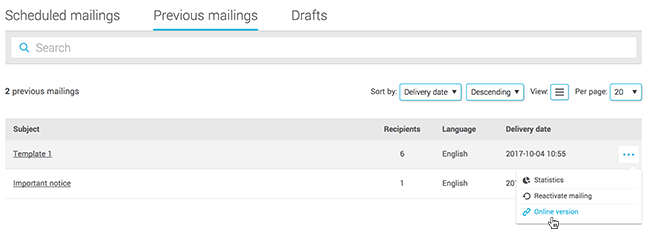
- Copy and paste the URL of this page.
You can then take a screenshot of the page, print it out as a PDF or automatically convert it to a PDF document using an online tool or software like Adobe Acrobat, for example.
You may need to try a few before your pdf is displayed as you want! Some converters can give different results depending on the code of your email.